
Connecting your accounts
Connect a venue's social accounts in HQ
Connect, check and disconnect a venue's Facebook, Instagram, TikTok and Google Business accounts so Pip can post for it.
Where to find it
Select Connections under Venue in the venue menu. Pip can only post to accounts connected here. Head office can also manage shared accounts from this page.
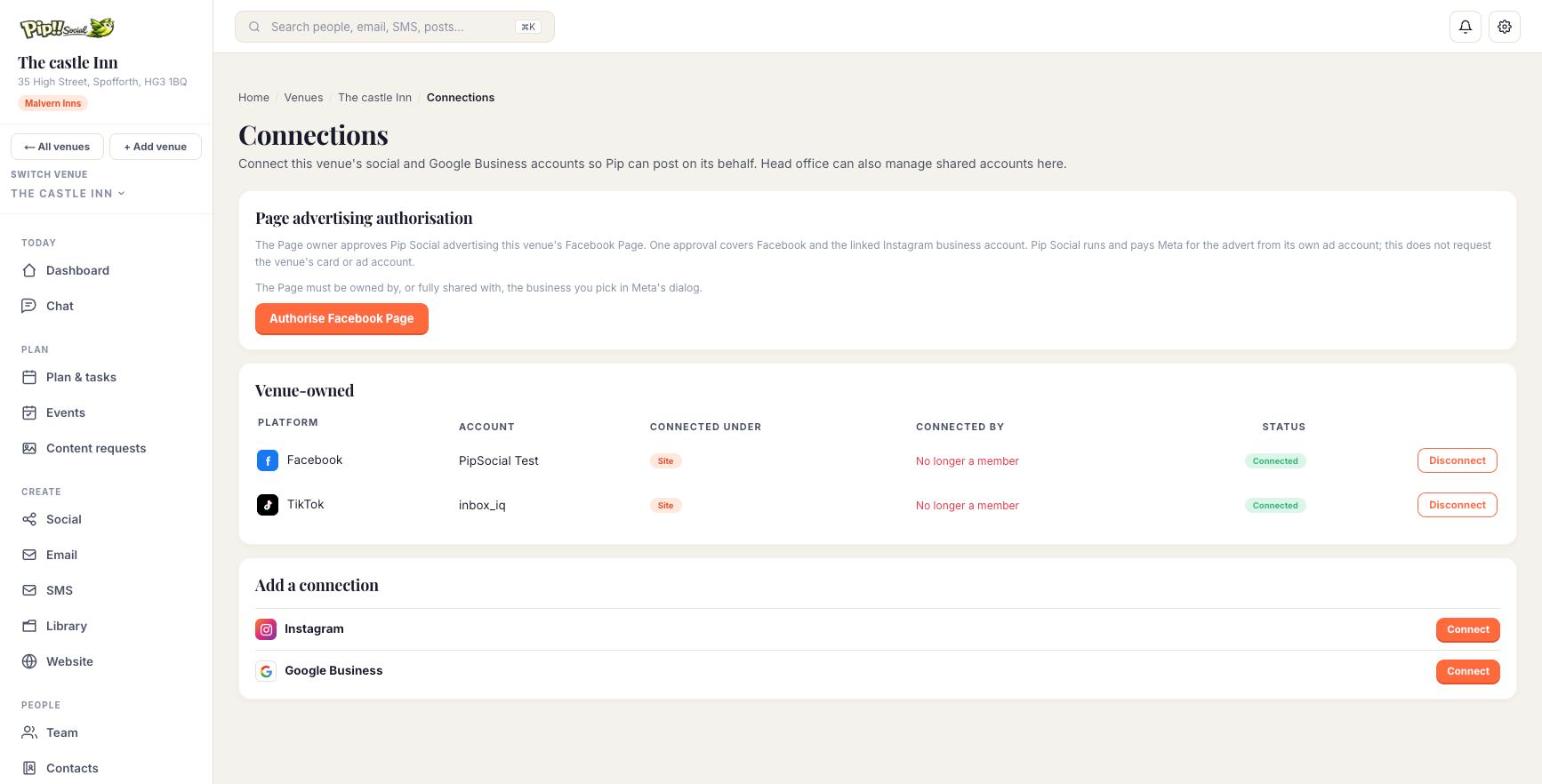
Accounts already connected
The Venue-owned table lists each connected account:
Platform and Account: the service and the account name.
Connected under: whether it belongs to this site or is shared.
Connected by: the person who connected it. If they have left the team, it says No longer a member. The account still works, but you may want someone current to reconnect it.
Status: Connected when all is well.
Select Disconnect to stop Pip using that account.
Adding an account
Under Add a connection, select Connect next to the service you want, such as Instagram or Google Business, and sign in to that account when asked.
Advertising authorisation
The Page advertising authorisation card at the top is only needed for boosting posts. See Boost a post from HQ for how it works.