
Contacts and audiences
Find and manage your contacts
Search people, open their details and manage email and SMS separately.
Open Contacts
Tap Settings → Your marketing → Contacts, or choose Contacts from the action menu.
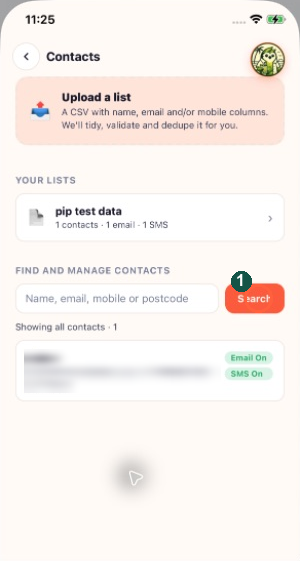
The marker highlights Search. Use it to find a contact before opening their details.
Find a person
Enter a name, email, mobile or postcode in Find and manage contacts, then tap Search. Use Clear search to return to the wider list.
Narrow to a list
Use Your lists to select a list. Show all lists removes the list filter. List membership and channel permission are separate.
Edit the details
Open the person's row. Review First name, Email, Mobile and Postcode. Correct only the details you know are right.
Review preferences
Email channel and SMS channel are independent. Save the changes and check the updated row. A contact can be eligible for email while being unavailable for SMS.
Respect opt-outs
Turning a channel back on may require confirmation that the person asked to opt back in and a reason. Do not re-enable it simply to reach more people. Deleting a contact does not remove the retained protection against contacting an opted-out address or number.