
What Pip sees
Manage reviews, comments and messages
Open the inbox, review a reply and use the correct sending route.
Open your inbox
Open Social listening and tap Open inbox. Inspect the item and its source before deciding how to respond.
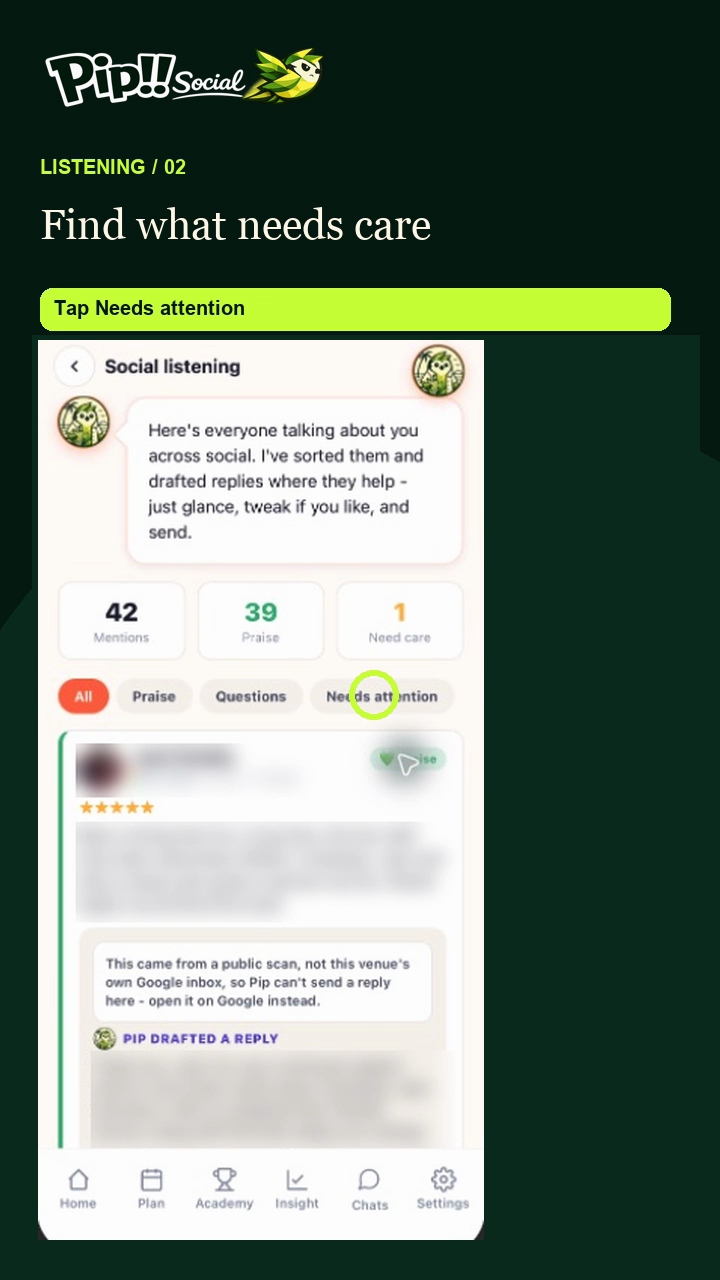
The ring highlights Needs attention. Use that filter to find items needing care; names and private review text are masked in this example.
Read the context
Check what the customer is referring to. For an issue needing personal care, arrange the appropriate response rather than sending a generic message.
Prepare and edit the reply
Open the reply or Review for platform action. Review Pip's suggested text and edit the facts, tone and next step so it suits the situation.
Check the edited reply
Run the reply check again after changing the wording. Resolve required fixes and read any sending restriction shown.
Use the action shown
Send reply sends through a supported connected route. Respond on Google or another platform opens the external destination; follow through there. Copy reply copies the text for use elsewhere. A public-scan Google review can require the external route even if a channel is connected.
Check the result
Do not treat copied text or opening Google as a posted reply. Check the destination and the item status. Use Ignore for an item you do not intend to act on, after reviewing it.