
Your team and venues
Invite contributors and marketing team members
Give each person the right role for capturing content or creating campaigns.
Open team management
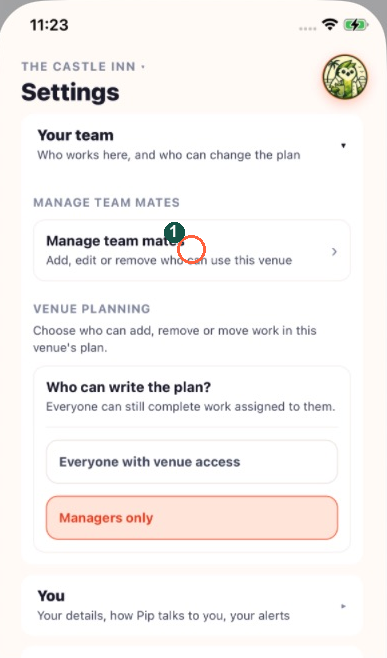
Tap Settings, then Your team, then Manage team mates. If Speak to your GM appears, your role cannot manage this venue's team.
The highlighted Manage teammates control opens the team list. From there choose Add a teammate.
Add a team mate
Tap Add a team mate and enter the person's details. Check their email carefully: this is where their invitation goes.
Choose their job
Choose Contributor for people capturing photographs and videos, fulfilling requests and chatting with the team. Contributors do not publish posts or send email or SMS. Choose Marketing for someone turning content into campaigns. General manager (GM) is for organising the plan and overseeing the team.
Send the invitation
Tap Send invite. Check the confirmation and the Invited section. The person needs to open the invitation and finish joining. Invite as many contributors as you need across your bar, kitchen and floor team.
Review existing access
Use Manage beside an existing person to inspect their role and available permissions. Check the venue and person before changing access. An invitation that is still pending can be withdrawn with Cancel invite.